Guide5 minute read
How to charge for travel as a mobile business
If you go to your customers, every booking starts with a drive. Here is how to turn that drive into a travel charge that is fair to you and to them, and how to show it before anyone books.

Director, DocMason and FullDiary
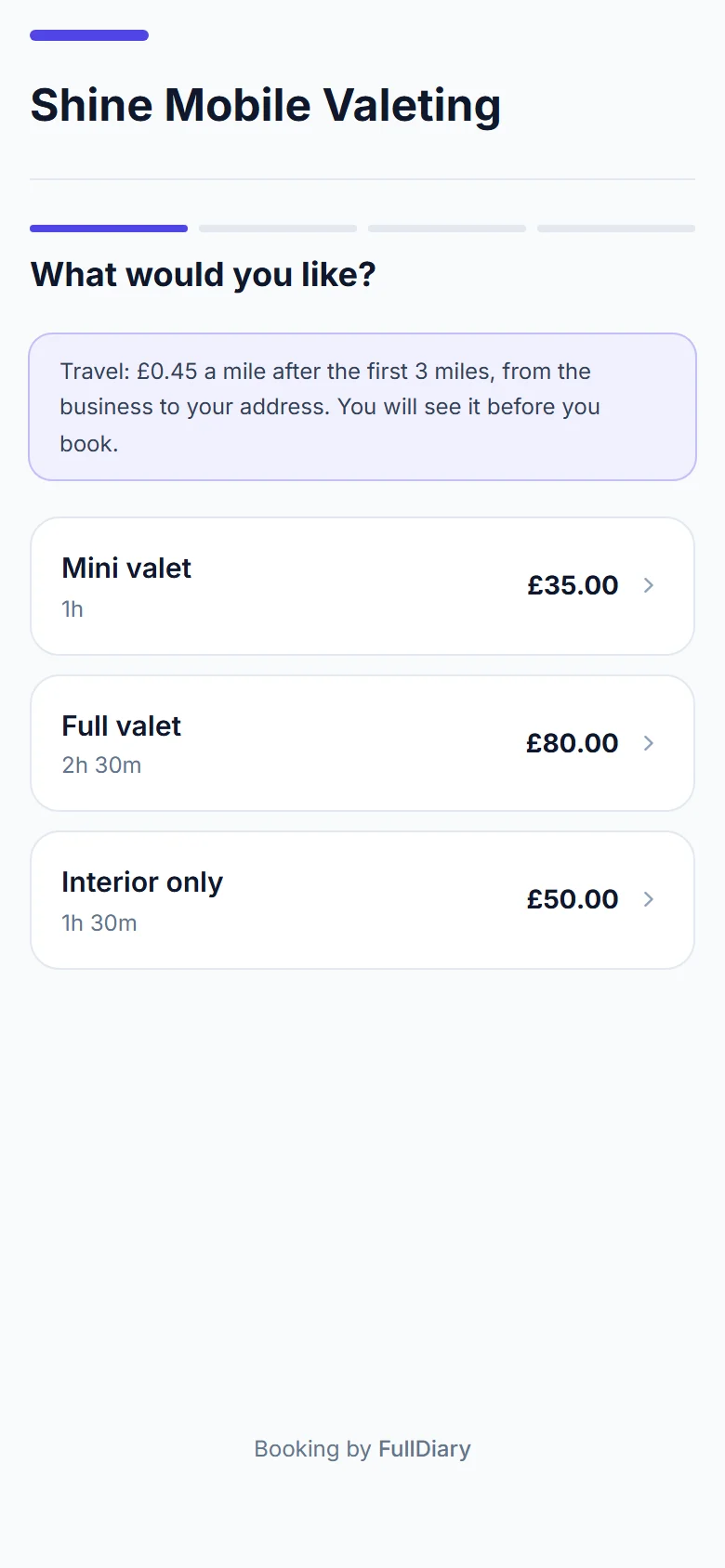
If your business goes to the customer, every booking starts with a drive. A customer twenty minutes away costs you fuel, wear and time that one down the road does not, for the same service at the same price. A travel charge evens that out.
This guide is for mobile valeters, dog groomers, hairdressers, beauty and nail techs, massage therapists, podiatrists and anyone else whose work happens at the customer's address. We make FullDiary, the booking system from DocMason for appointment businesses, and it charges for travel the way this guide describes.
Three ways to charge for the drive
- Put it in your prices. Nothing extra to explain, but every customer pays for an average drive: the ones round the corner pay for miles you never drove, and the far ones cost you.
- A flat call-out fee. Easy to say, but the customer next door pays the same as the one twenty miles away.
- A price per mile. The charge follows the drive. With the first few miles free, customers nearby pay nothing and the ones further out pay for their own journey. This is how FullDiary charges.
Choosing your price per mile
There is no right number, and we will not suggest one: it is your policy. Think about what a mile costs you in fuel and wear, and what the time behind the wheel is worth when you could be working.
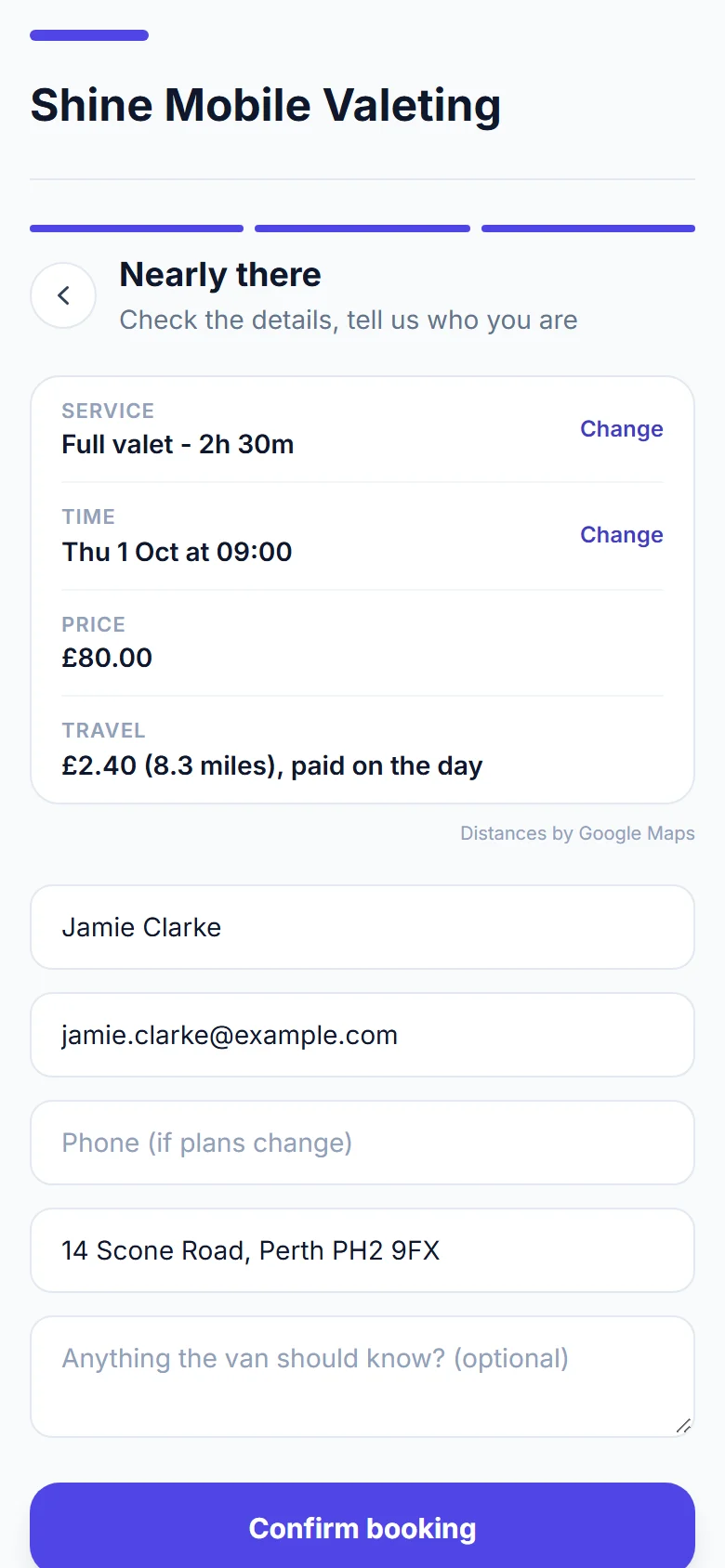
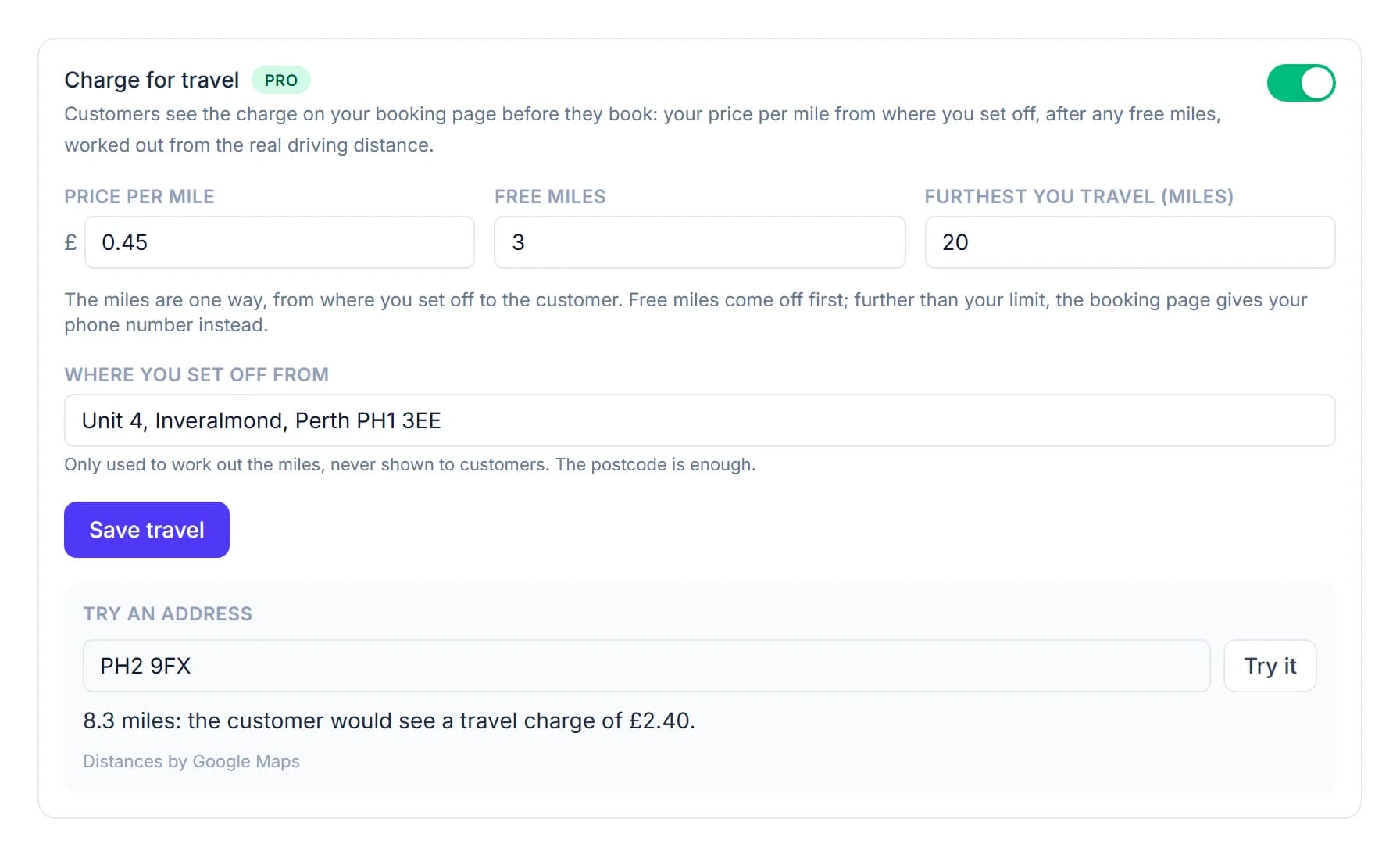
Decide too whether the price covers the way home. FullDiary counts the miles one way, from where you set off to the customer, so if you want the return journey paid for, allow for it in your rate. The charge is rounded up to the next 10p: at 45p a mile after 3 free miles, a customer 8.3 miles away pays £2.40.
Free miles and how far you go
- Free miles. Make the first few miles free and your local customers pay exactly the price on your page. Only the drive beyond them is charged.
- A furthest distance. Decide how far you will go for a booking made online. Anyone further away is asked to ring you, so you can still fit them in when the day allows.
Tell customers before they book
The worst time to mention a travel charge is on the doorstep. Say what your rule is before anyone picks a time, and show the exact charge on the booking itself, so the price they agreed to is the price they pay.
On a FullDiary booking page the rule sits under the first step, in one line. Once a customer types their address with its postcode, the travel appears in their summary with the distance, before they confirm, and their confirmation email shows it on its own line.
Deposits, discounts and packages
Keep the travel apart from the service and everything else stays simple. In FullDiary a deposit is for the service alone, so the travel is paid on the day, or with the rest when the full price is taken up front. A discount code never comes off the travel, and a package covers the service but not the journey.
When some of your work is at your own place
In FullDiary a travel charge goes on every online booking once it is on, so it suits a business that goes to every customer. If you see most people at your own premises and only some at home, add the home visit as its own service with its own price instead, and only those bookings cost more.
Setting it up in FullDiary
Travel charges are part of Pro. Open Your shop (it takes your business's word, so it might say Your van or Your salon), choose Booking rules, and switch on Charge for travel. Add your price per mile, any free miles and the furthest you travel, and where you set off from, which customers never see. If your trade does not already ask for addresses, switch on 'Ask for the customer's address when they book' first, and the Travel card appears under it.
How travel charges work in FullDiary
Once it is on, you can change the travel on any booking in your diary, take it off, or work it out again, and an invoice made from a finished booking shows the travel on its own line.
Questions people ask
- Should I charge for the journey back?
- That is up to you. FullDiary charges one way, from where you set off to the customer, so if you want the return covered, build it into your price per mile.
- Should regulars pay for travel too?
- One rule for everyone is the easiest to explain. Free miles mean your nearest customers pay nothing anyway, and in FullDiary you can change or take off the travel on any single booking from your diary.
- What if a customer lives further away than I go?
- Your booking page asks them to ring you instead of booking online. If the day allows, you can still book them in from your diary, where the furthest distance does not apply.
- Is the travel part of the deposit?
- Not in FullDiary. The deposit is for the service alone, so the travel is paid on the day, or with the rest when you take the full price up front.
Read next
Written by
Matt SucklingDirector, DocMason and FullDiary
Matt runs Cynical Software Ltd, the Perthshire company that makes DocMason and FullDiary, and builds both.