New feature5 minute read
Moving from Cliniko? Your clients, notes and appointments come with you
Export your Clients, Treatment notes and Attendees from Cliniko and import them. Every client arrives with their details, every treatment note lands on their profile dated on the visit, and your appointments go into your diary.

Director, DocMason and FullDiary
FullDiary is the booking system from DocMason for appointment businesses: an online booking page, a diary and reminders in one place. Switching from Cliniko used to mean a choice between retyping years of notes and leaving them behind in a system you no longer pay for. Now you export two files and import them, and the history comes with you.
Two exports from Cliniko
In Cliniko, open Settings, then Data exports. Export Patients (Cliniko calls them clients in the file) and Treatment notes, each for Any time to Any time so nothing is clipped, and choose the Data file format rather than Spreadsheet, which wraps the long ID numbers for Excel. You need to be an Administrator in Cliniko, and the download links last two weeks.
Your clients, with everything that has a place
On Customers, choose Import customers, pick Cliniko from the list of systems, then the Clients file. The columns are read for you: first and last name, email, the mobile phone, date of birth, the address parts joined into one, and the three fields a clinic keeps, gender, occupation and emergency contact. Cliniko's Created At column becomes the date they joined you, so a client you have seen since 2019 says so on their profile instead of dating from the day you switched. Each field takes one column; if two columns point at the same field, the import waits until you have chosen which one to keep. Anyone already in your customers is matched and never overwritten.
Then the treatment notes
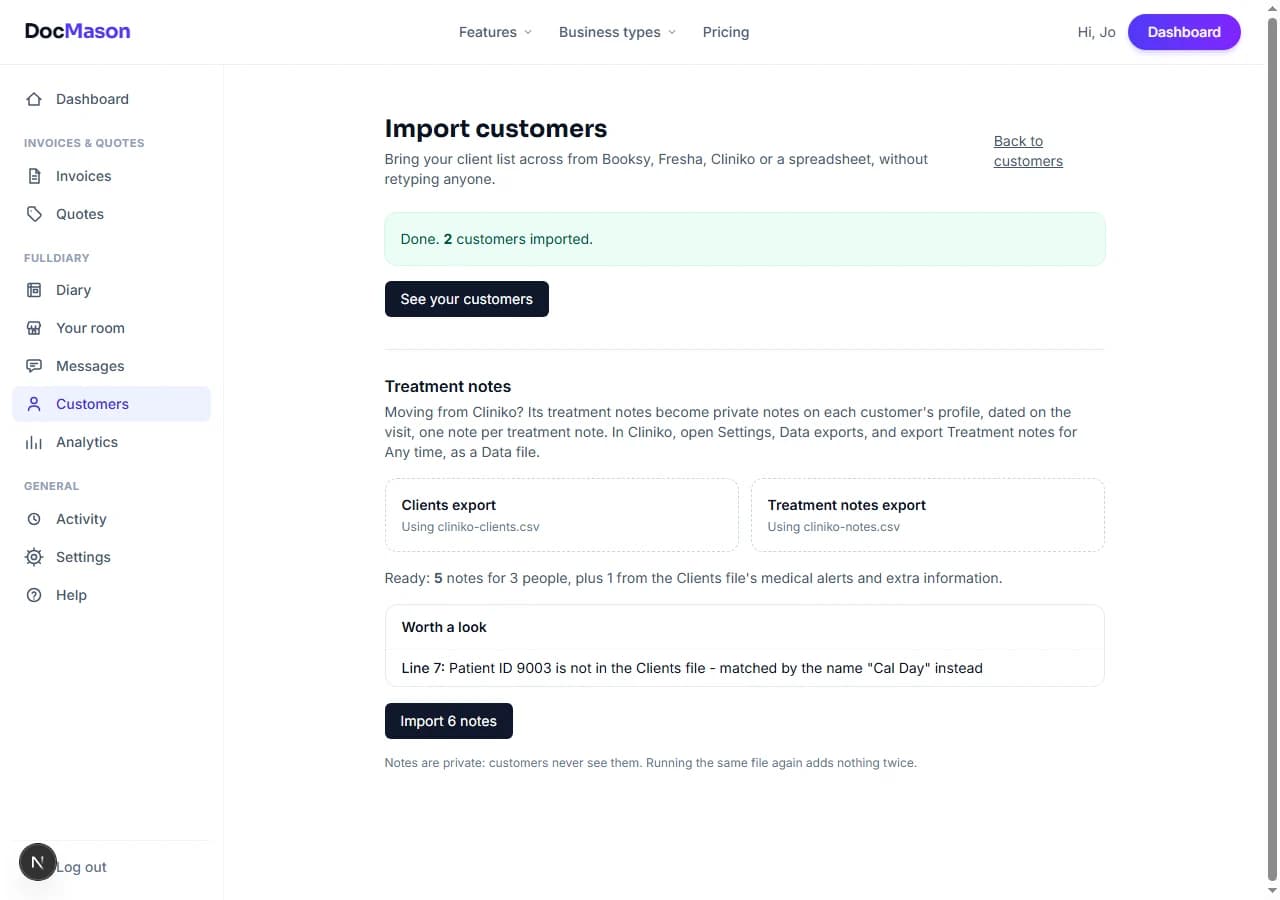
Once the clients are in, the Treatment notes step appears underneath. Pick the Treatment notes file and FullDiary reads every note, finds its client by Cliniko's Patient ID, and shows you how many notes for how many people before anything is saved. Each note becomes a private note on that client's profile, dated on the day and time of the visit rather than the morning you wrote it up.
Notes that read as you wrote them
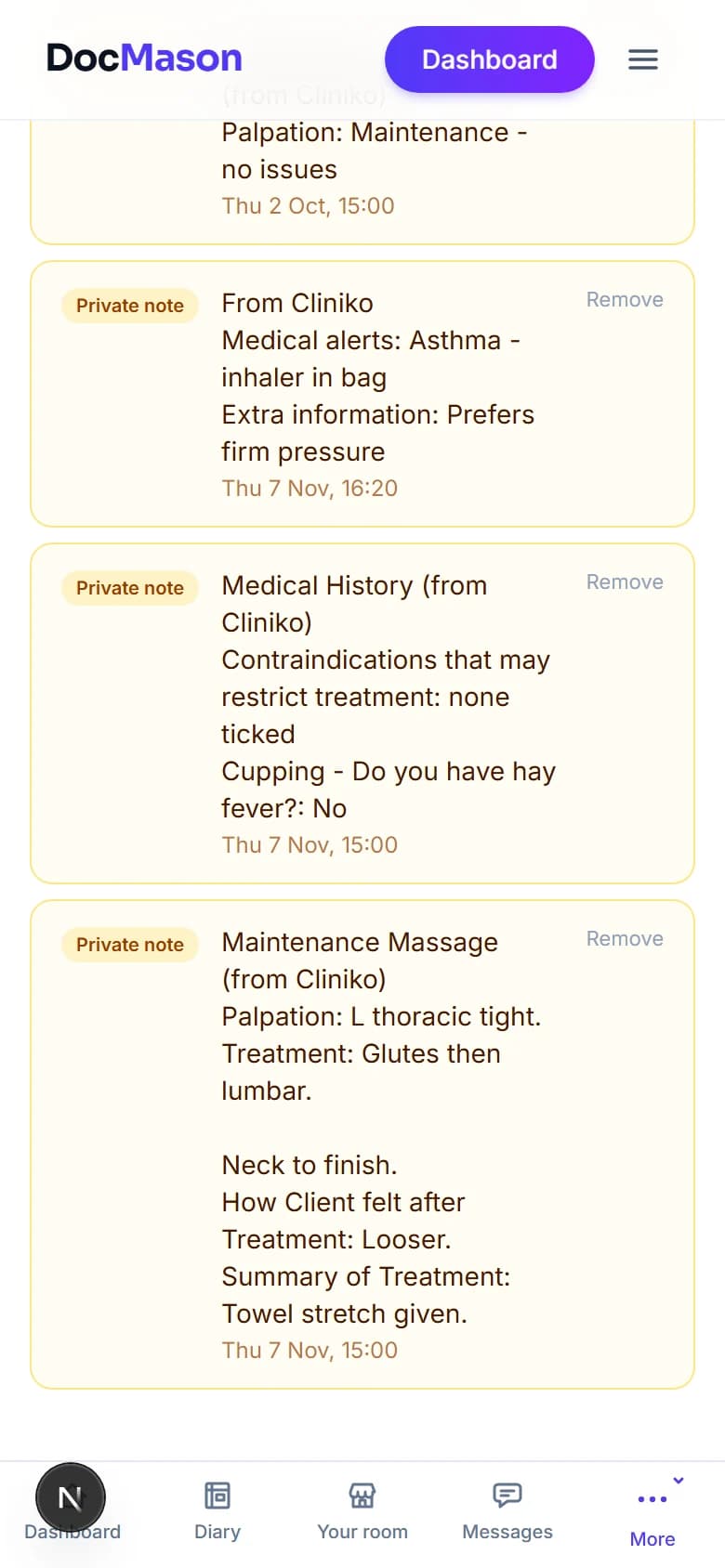
Cliniko stores a note as a template full of markup. FullDiary turns it back into words: the note's title first, then each question you answered as a line, like Palpation, Treatment and Summary of Treatment, with the questions you left blank left out. A medical history with no contraindications ticked says so in one line, because a clear intake and a missing one should not look the same. Drafts come across marked as drafts. Nothing is summarised or reworded; the words are yours.
- Medical alerts travel too. A client's Medical Alerts, Extra Information and Appointment Notes from the Clients file become a first note on their profile, dated when they joined you.
- Private means private. Imported notes are private notes. They appear on the profile and the diary card for you and your staff, and never on anything a client sees.
- Safe to run twice. Every imported note remembers where it came from, so exporting in date ranges that overlap, or running the same file again, adds nothing a second time.
- Big practices in parts. Up to 2000 notes per run. Export by year if you have more, in any order.
And your appointments
Under the notes is an Appointments step. Export Attendees from Cliniko, and Calendar events if you want your blocked-out times too, and pick them. For each of your Cliniko appointment types you choose which of your FullDiary services it is, so every booking has the right length and price. Upcoming bookings go into your diary at their exact times and get FullDiary's reminders; no confirmation emails go out, because Cliniko already sent those, so switch Cliniko's reminders off once you have moved. Past appointments become completed visits, so each client's profile shows when they first and last came in, without anyone being emailed about it.
- Nothing doubled. If you have already typed a booking into your diary by hand, the same time from Cliniko is left out and named, not booked twice.
- Cancelled and group appointments are left out and listed, so you can see exactly what came across.
Setting it up
There is nothing to switch on and it is on every plan. Open Customers, then Import customers, choose Cliniko, and start with the Clients file. If your clients are already in, choose Import treatment notes or appointments only and give it the files.
Questions people ask
- Do my clients see the imported notes?
- No. They are private notes, the same as the ones you write on a booking's card. Nothing a client sees reads them.
- Do my appointments come across?
- Yes. Upcoming ones go into your diary with reminders and past ones become each client's visit history. Invoices and payments do not come across.
- What if a note's client is not in my customers?
- The import tells you who, with the line in the file. Import the Clients file first, then run the notes again; the notes already in are skipped.
- Which plan is it on?
- Every plan. Importing clients and treatment notes is on Free and Pro alike.
Read next
Written by
Matt SucklingDirector, DocMason and FullDiary
Matt runs Cynical Software Ltd, the Perthshire company that makes DocMason and FullDiary, and builds both.